Does your agency need more tools, or just better email habits?



The average office worker gets 117 emails per day and sends 31, showing email overload is still real. In agency life, you can safely DOUBLE those figures. That’s hundreds of decisions, open, read, respond, file, ignore – before you even start your actual work.
Every cluttered inbox is a mental weight you’re dragging through your day. And every “quick reply” that turns into a 45-minute thread is billable time evaporating into thin air.
That said, the difference between thriving agencies and drowning ones often isn’t talent or the number of tools.
It’s email discipline.
Master your inbox, and you’ll reclaim hours each week, reduce client anxiety, and leave work at a reasonable hour.
Here’s how to make it happen.
What is the cost of poor email habits?
Let’s talk numbers, because this one hurts.
Studies show that employees check their email an average of 36 times per hour. That translates to constant interruptions, broken focus, and a phenomenon researchers call “context switching.”
Every time you stop what you’re doing to check a new message, it takes an average of 23 minutes to fully refocus on your original task.
Think about what that means for your team:
- A recruiter halfway through reviewing resumes gets pinged about a scheduling conflict
- An SEO specialist analyzing campaign data pauses to answer a quick question from a client
- A PR manager drafting a pitch loses momentum because of an internal request
Each interruption compounds. By the end of the day, your team has spent more time recovering from distractions than actually doing focused work.
And the financial impact is huge as well. Research from Grammarly and Harris Poll found that poor communication costs organizations roughly $12,500 per employee annually. For an agency with ten team members, that’s $125,000 lost to inefficiency.
Unnecessary emails alone can cost around $1,800 per worker, while poorly written emails cost between $2,100 and $4,100 per employee.
The problem goes deeper than wasted time:
- 55% of workers feel frustrated when they can’t find specific information in their inbox
- 63% report that poor email management leads to wasted time
- 52% say they lose visibility on projects because there’s no clear paper trail
Your inbox becomes a black hole where important messages disappear, urgent requests get buried, and team members spend hours searching for that one attachment they know they received last week.
For agencies handling multiple clients and projects simultaneously, this chaos multiplies fast.
Let’s explore ways you can prevent it.
1. Unify email, chat, calls, and tasks
Here’s what most agencies get wrong: they treat communication channels as separate systems.
Email lives here. Chat lives there. Tasks go in another app. Calls happen through yet another platform. Files get scattered across three different cloud services.
Your team ends up toggling between applications 1,200 times per day. That’s not a typo. Research confirms that workers switch between apps constantly, and this switching eats up roughly 9% of their entire workweek.
The solution isn’t to pick one channel and force everyone to use it. Email remains essential for client communication, contracts, and documentation. Chat works better for quick internal updates. Calls handle nuanced conversations.
The solution is bringing everything together.
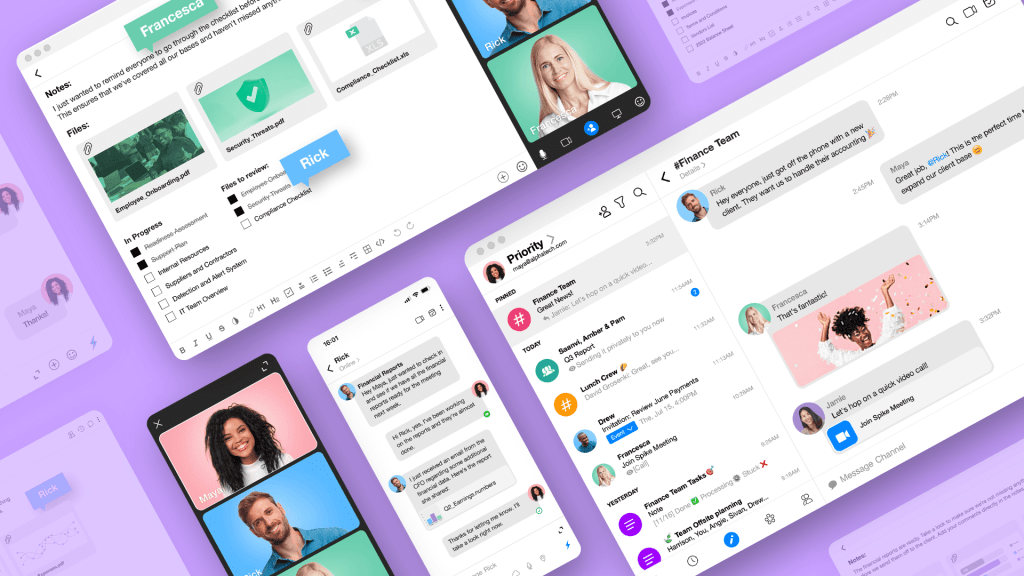
When your email client also handles team chat, video calls, task management, and collaborative documents, something shifts. Conversations flow naturally. You stop losing context when discussions move between channels.
Spike approaches this problem by combining email, messaging, video meetings, notes, and tasks in a single workspace. Your team members can chat with colleagues in a conversational interface while clients receive standard professional emails.
Internal discussions stay organized in channels and groups without requiring everyone to adopt a separate tool.
The impact matters most for agencies because you’re constantly switching between:
- Internal team communication
- Client-facing correspondence
- Vendor and partner coordination
- Project-specific discussions
When all of this happens in one place, you stop losing information at the boundaries between tools.
2. Use AI to save hours in your inbox
A study by MailBird (conducted to 250+ professionals from around the world) shows that 40% of workers receive between 61 and 200 emails daily, and spend three to five hours a week managing their inboxes.
Now, not all of those 200 emails require the same level of attention. Some need immediate responses. Some can wait. Some shouldn’t have been sent to you at all.
But without help, you treat every email the same way. You open it. You read it. You decide what to do with it.
This process repeats hundreds of times each week. Even if each decision takes only 30 seconds, the cumulative drain on mental energy becomes significant.
AI changes the equation.
Modern AI-powered email tools can:
- Summarize long email threads so you catch the key points in seconds
- Draft contextual replies based on the conversation history
- Identify which messages actually need your attention versus which can be handled later
- Translate messages instantly for international communication
- Condense lengthy attachments into digestible summaries
Think about how this applies to agency work. The time savings compound. If AI saves you just 30 minutes per day on email management, that’s 130 hours per year. For a team of five, that’s 650 hours reclaimed for actual billable work.
Tools like Spike include AI features that summarize conversations, draft messages with appropriate context, and help you brainstorm responses. The AI understands the thread history, so generated replies feel relevant rather than generic.
3. Make email feel as fast and natural as chat
Email has a formality problem.
Traditional email interfaces encourage unnecessary structure. Subject lines. Formal greetings. Sign-offs. Quoted text from previous messages creating endless nested threads.
This formality slows everything down. A simple “yes, let’s do Tuesday at 2pm” becomes a full production with headers, footers, and re-quoted context.
Meanwhile, chat apps taught us that communication can be immediate and conversational. Quick messages. Fast replies. No ceremony.
The gap between these two experiences creates friction. Teams default to chat for internal communication because it feels faster. But then clients, vendors, and external partners remain stuck in email. Information fragments across systems.
Conversational email bridges this gap.
When email displays as a continuous conversation rather than separate message cards, the experience changes dramatically. You see the full discussion flow without headers cluttering every response. Replies feel natural, like texting someone rather than composing a formal letter.
Spike transforms traditional email into this chat-like format. Your team experiences the speed and ease of messaging. External recipients receive normal emails they can read in any standard email client. Nobody needs to change their tools or habits.
The impact on response times becomes noticeable immediately:
- Quick questions get quick answers instead of sitting in draft folders
- Team members feel comfortable sending shorter messages because the interface supports it
- Conversations that previously took days via email can resolve in hours
For agencies where client responsiveness matters, this speed advantage translates directly into better relationships and higher satisfaction scores.
4. Find important emails faster with smarter organization
How much time do you spend searching for emails?
If you’re like most professionals, the answer is “too much.” As mentioned before, 55% of people find it frustrating when specific documents prove difficult to track down.
Traditional folder systems require discipline that rarely survives a busy week. You might set up elaborate hierarchies with folders for each client, project type, and timeframe. But when you’re racing to respond to an urgent request, filing messages properly drops to the bottom of your priorities.
Search features help, but only if you remember the right keywords. Searching for “logo feedback” when the actual email subject said “brand assets review” yields nothing useful.
Modern email organization needs to be automatic and intelligent. Advanced search capabilities should let you find anything instantly:
- Search by sender, recipient, date range, tag, keyword, or file type
- Filter messages across all connected accounts simultaneously
- Preview files without downloading them
- Surface related conversations automatically
File management features that aggregate attachments in one viewable location mean you stop opening individual emails just to find a document you know exists somewhere. Color-coding by email account helps when you manage multiple addresses. Personal email, agency email, and client-specific accounts each get distinct visual identifiers.
Spike offers Super Search that works across all connected accounts, finding emails, files, and conversations quickly. The file management view lets you browse attachments without hunting through individual messages.
For agencies handling dozens of client relationships and projects, these organizational tools transform email from a liability into an actual asset.
Agencies that win with better email organization
Different agencies face different email challenges. But the underlying principles remain consistent: unify communication, leverage AI, and prioritize intelligently.
Here’s how this plays out in practice.
Recruitment Agency
Recruitment agencies live and die by communication speed.
Candidates expect quick responses. Clients expect updates on searches. Hiring managers need interview scheduling to happen seamlessly.
A typical recruiting workflow involves:
- Receiving candidate applications via email
- Coordinating interview schedules across multiple parties
- Managing ongoing relationships with both clients and candidates
- Tracking where each search stands
Poor email habits create problems at every stage. Applications get lost in crowded inboxes. Scheduling emails bounce back and forth for days. Important follow-ups slip through cracks.
Better email habits look like:
- AI summarizing candidate applications so recruiters quickly identify strong fits
- Unified inbox showing messages from all connected accounts (personal recruiting email, company email, specialized job board accounts)
- Priority sorting that surfaces client requests above routine notifications
- Conversational email making interview scheduling feel like quick text exchanges rather than formal negotiations
- Shared inbox features letting multiple team members manage high-volume incoming applications together
SEO Agency
SEO agencies juggle technical work with client communication.
Analysts need focused time for data review and strategy development. Account managers need to handle client questions and approvals. Leadership needs visibility across all accounts.
Email challenges include:
- Client reporting emails that require thoughtful responses
- Internal discussions about strategy and findings
- Competitor analysis and industry news worth sharing
- Tool notifications and automated reports
The fragmentation problem hits SEO agencies hard because so much work happens in specialized platforms. Google Analytics, SEMrush, Ahrefs, Google Search Console – each generates emails that need attention.
Better email habits look like:
- AI summarizing lengthy reports so analysts can quickly catch essential changes
- Task integration letting team members convert email requests into tracked action items
- Channels for project-specific discussions that keep client conversations organized
- Calendar integration for scheduling strategy calls without endless back-and-forth
Professional Employer Organization
Professional employer organizations (PEOs) handle HR, payroll, benefits, and compliance for client companies.
The communication demands are intense:
Employee questions about benefits and policies
- Client companies seeking guidance on HR issues
- Compliance updates that need distribution
- Payroll processing communications
- Benefits enrollment coordination
Accuracy matters enormously. A misunderstood email about benefits could create legal liability. A delayed response to a compliance question could cost a client money.
Better email habits look like:
- Shared inbox features letting HR specialists collaborate on complex employee questions
- AI summarizing lengthy policy documents and compliance updates
- Organized filing that creates clear documentation trails
- Video meeting integration for sensitive conversations that shouldn’t happen over email
- Collaborative notes for maintaining internal knowledge bases
- File management that keeps deliverables organized and accessible
Digital PR Agency
Digital PR agencies manage relationships constantly.
Pitching journalists. Following up on coverage. Coordinating with clients on messaging. Managing media lists. Tracking placements.
The volume of outreach creates email challenges unique to PR:
- Tracking which journalists have been contacted and their responses
- Managing multiple simultaneous campaigns for different clients
- Coordinating internally on messaging and approach
- Documenting coverage and results
Missed responses become missed opportunities. A journalist who doesn’t hear back within hours moves on to another story. A client who waits too long for an update gets frustrated.
Better email habits look like:
- Priority inbox ensuring journalist responses surface immediately
- Conversational email enabling quick replies without formal overhead
- Unified inbox managing personal networking accounts alongside agency accounts
- AI drafting follow-up messages that maintain appropriate tone and context
- Groups for client-specific team discussions that include all relevant stakeholders
Wrap up
Your agency probably doesn’t need another tool. You need better email habits supported by the right email platform. Unified communication means less context switching. AI assistance means faster processing. Priority sorting means focused attention. Smarter organization means less searching.
That’s exactly why Spike exists. Built for teams who communicate like humans, not robots. Conversational. Unified. AI-assisted. It turns your inbox from a daily battle into the operational backbone your agency deserves.
Stop managing your email. Start letting it work for you.
About the author:
Ben Hadley
Ben doesn’t buy into “the way it’s always been done.” He’s spent his career challenging hiring norms and rethinking how remote work should feel. At Remployee, he helps create honest tools and opportunities for people tired of the gig economy’s empty promises.